Syncing User Attributes via SSO
Note
This guide applies once SSO is set up. To configure SSO in the first place, see Azure Entra ID SSO.
When a user signs in via SSO, Skribble reads attributes (claims) from the token your identity provider sends. We use these attributes to keep the user’s profile in Skribble in sync with the information held in your directory. The sync runs on every login, so any change you make in your identity provider is reflected the next time the user signs in.
This guide explains which attributes Skribble syncs by default and which optional attributes you can configure to unlock additional features such as cost-centre reporting.
Default Attributes
By default, Skribble syncs the user’s first name and last name from the SSO token. For SAML, the expected claim names are:
First name –
http://schemas.xmlsoap.org/ws/2005/05/identity/claims/givennameLast name –
http://schemas.xmlsoap.org/ws/2005/05/identity/claims/surname
These follow the standard WS-Federation / Microsoft conventions and most identity providers expose them out of the box.
Note
If you use OpenID Connect rather than SAML, the equivalent claim names are given_name and surname.
Cost Centres
In addition to the default attributes, Skribble can sync a cost centre for each user and tag every signature they perform with that value. This is the foundation for the cost-centre signature report described in Track signature usage.
The “cost centre” can be any classifier that makes sense for your organisation — a department code, a business unit, a project identifier, an internal cost-centre number, and so on. Whatever value you send, Skribble will store it on the user and use it to attribute their signatures.
How to provide it
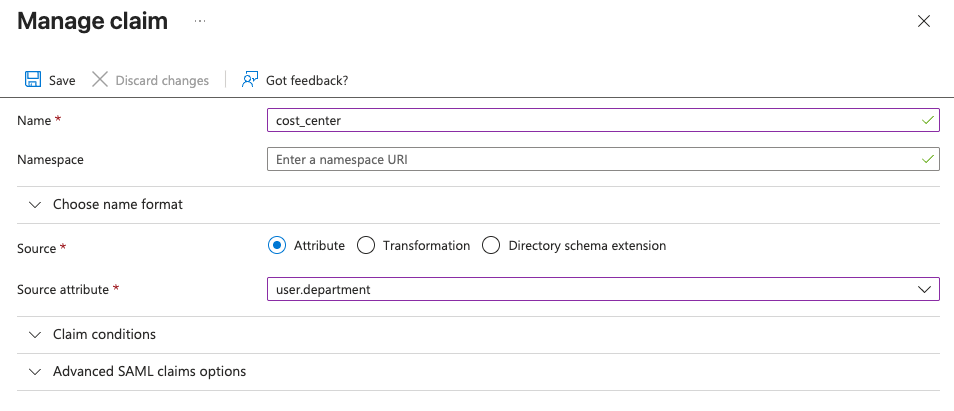
In your identity provider, add a claim to the SSO token with the attribute name cost_center. The value can be any string that fits your reporting needs.
For Azure Entra ID with SAML, this is done in the SSO application’s Attributes & Claims section by adding a new claim. The example below maps the user’s department in Entra ID (user.department) to a SAML claim named cost_center:
How it works
The
cost_centerattribute is read on every login. Whichever value is in the token at sign-in time becomes the user’s current cost centre in Skribble.From that point on, every new signature the user performs is tagged with the current cost centre.
Tagged signatures appear in the
cost_centercolumn of the signature usage report, available under Admin Area → Activity → Export data. See Track signature usage for details on downloading and interpreting the report.
Important considerations
Only new signatures are tagged. Signatures made before a user’s cost centre was first synced will not have a value in the report.
No direct visibility on the user profile. Synced cost centres are not shown on the user’s profile in Skribble. You will only see them in the signature usage report.
A user may appear multiple times in the report. If a user’s cost centre changes between two signatures — for example, they move from one department to another — each signature is attributed to the cost centre that was current at the time of signing. The same user will then appear once per distinct cost centre in the report.
Need other attributes?
If you have a use case for syncing additional attributes beyond the defaults and the cost centre, please contact your Skribble representative.